
Email Security Does Not End at the Inbox

Almost every conversation about email security is about what comes in. Phishing, business email compromise, malicious links, the attacker trying to get through the door. It is where the budget goes and where the products compete. But data does not only arrive by email. It leaves by email too, and the outbound direction is the one most organisations barely watch. A security programme that inspects every message coming in and waves through everything going out is guarding one side of a two-way street.
The uncomfortable part is that the outbound problem is not rare or theoretical. It is one of the most common ways organisations lose data, and most of it is not the work of an attacker at all. It is an employee, doing their job, sending the wrong thing to the wrong place.
The data mostly leaves by accident
When people imagine data leaving an organisation, they picture a thief. The reality is far more ordinary. The single most common cause is a misdirected email: the right file to the wrong recipient, an autocomplete that filled in the wrong name, a reply-all that should have been a reply, a list of clients in the To field instead of the Bcc.
In the United Kingdom this is not a footnote, it is the headline. Personal data being emailed to the wrong recipient is consistently among the most reported types of data security incident to the Information Commissioner's Office, and human error of this kind accounts for a large share of all breach notifications the regulator receives. These are not sophisticated events. They are a normal person making a normal mistake with an abnormal consequence, because the file happened to contain something sensitive and the recipient happened to be the wrong one.
Accidental loss sits alongside the deliberate kind. Industry research in 2025 found that more than three quarters of organisations experienced an insider-driven data-loss incident in the previous eighteen months, and the Ponemon Institute's work on insider risk consistently attributes the majority of these incidents to careless or negligent employees rather than malicious ones. Whether the cause is a mistake or an intention, the exit route is the same, and it is the one pointed away from the inbox.
Why the outbound direction gets ignored
There is a reason so few organisations watch outbound email well, and it is not that they do not care. It is that the traditional tool for the job, data loss prevention, earned a bad reputation by being painful to live with.
Classic DLP works by matching content. It scans outgoing mail for patterns that look sensitive, a string that resembles a card number, a document marked confidential, anything matching a rule, and it blocks on a match. The trouble is that sensitive-looking content is everywhere in legitimate business. Every invoice carries a bank account. Every contract is confidential. A content-only filter cannot tell the finance team emailing an invoice to a real client from someone leaking one, because the content is identical. So it does what rule engines do: it blocks both, floods the security team with alerts, and interrupts people doing their jobs. Teams respond the way anyone would to a smoke alarm that goes off when you make toast. They stop trusting it, they widen the exceptions, and eventually it protects very little. It is telling that in the same 2025 research, fewer than half of organisations said their current DLP actually stops sensitive data leaving.
The failure is not that DLP looked at content. It is that content was all it looked at.
The missing half is context
An outbound message carries two things that matter, and legacy tools only measure one. The first is how sensitive the content is. The second, which decides almost everything, is where it is going and whether that is normal.
Those two questions have to be asked together, because neither means much alone. A spreadsheet of customer records is highly sensitive, but sending it to a colleague in the same team is routine and safe. The same spreadsheet sent to a personal webmail address, from an account that has never done that before, late at night, is an incident. The content is identical in both cases. Only the context tells them apart. This is the same lesson the inbound side of email security has been learning, and which runs through this whole series, from why fluent AI made appearance a poor guide to a message's intent to why the danger in a business email compromise is the request, not any payload. Outbound is the mirror image: the danger is not the data on its own, it is the data combined with a destination that does not make sense.
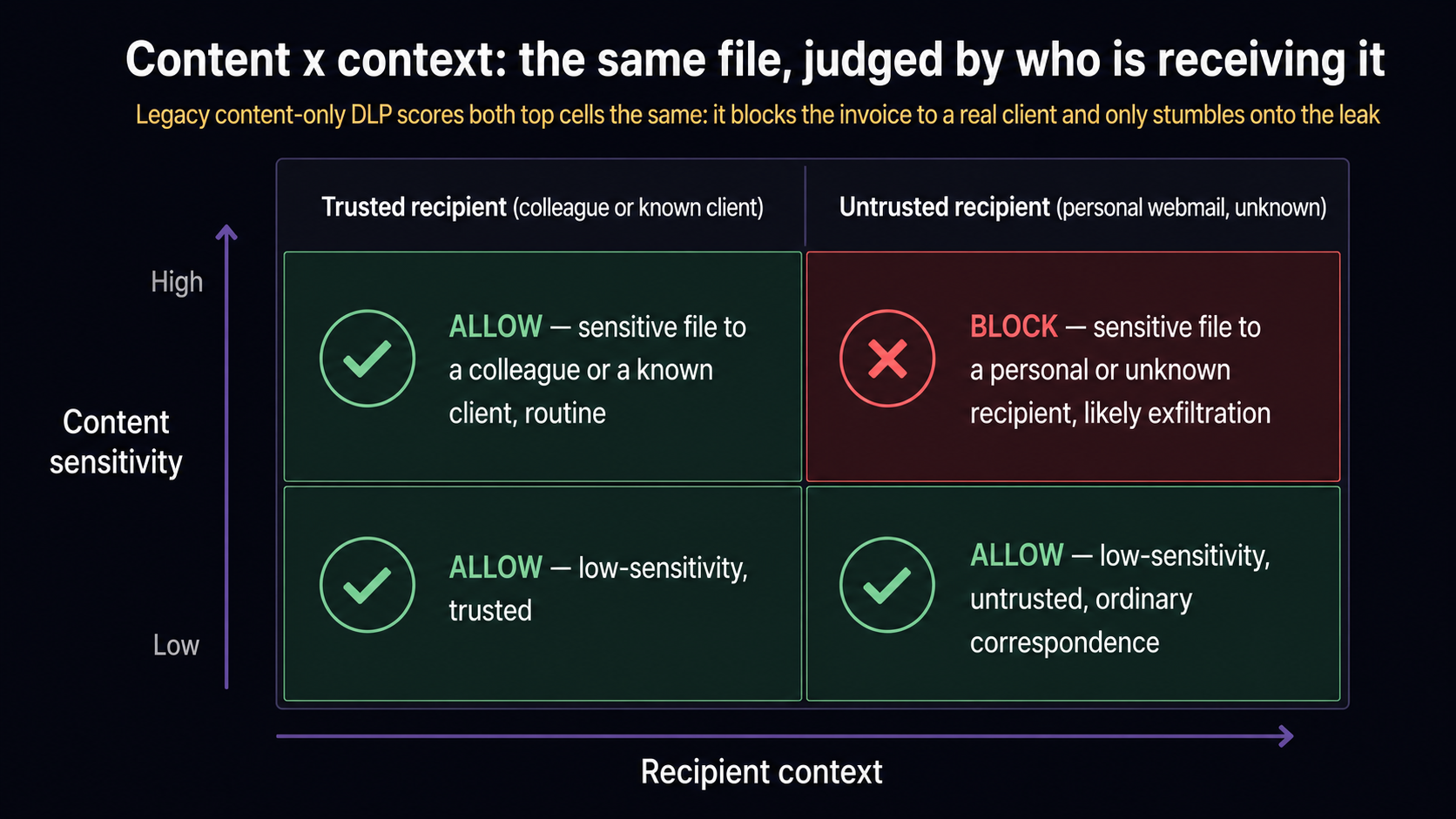
When you gate content sensitivity by context, the two failure modes of legacy DLP fall away together. The routine invoice to a known client stops being blocked, because the context is normal, which is what stops the security team drowning in false alarms. And the genuine exfiltration, the sensitive file heading somewhere it never should, stops being missed, because the context is the signal that a pure content match would have scored exactly the same as the invoice. The same idea removes the noise and catches the real thing.
A content filter sees a confidential file and blocks it. It cannot see that one is an invoice to a client and the other is your customer database walking out the door, because on content alone, they are the same email.
From compliance checkbox to security control
Watching outbound email properly changes what it is for. Treated as content-matching, DLP is a compliance exercise: a box to tick, a rule to satisfy, a source of friction. Treated as content-plus-context, the outbound channel becomes a genuine security control, because the same signals that catch an accidental leak also catch a compromised account exfiltrating data, and an insider quietly moving files before they leave. The behaviour that betrays them, an account sending unusual data to an unusual place, is exactly what a context-aware view is built to notice.
This connects directly to the inbound story told across this series. A compromised mailbox is an inbound problem when the attacker uses it to send phishing, and an outbound problem the moment they use it to steal data. The same account, the same intelligence about what is normal for it, should inform both. Splitting them into two disconnected tools, an inbound filter and a separate DLP that share nothing, means each sees half the picture.
What this looks like done well
The version of outbound protection worth having does three things that legacy DLP does not. It weighs content sensitivity against context, so the destination and the sending account's normal behaviour count as much as what is in the message. It uses a graduated response instead of a single block, because most violations are honest mistakes: a quiet coaching prompt for a low-risk lapse, holding a message for confirmation when the risk is higher, encrypting rather than blocking a legitimate but sensitive send, and reserving a hard block for the clear exfiltration. And it explains itself, so that when a message is held, the security team and the sender both see why, rather than facing a silent wall.
This is the level Osiris is built to work at. It treats the outbox as part of the same problem as the inbox, judging an outbound message by whether the data, the destination and the sending account's behaviour make sense together, responding in proportion rather than blocking indiscriminately, and explaining every decision. The goal is an outbound control people trust enough to leave switched on, because it stops the real losses without punishing the ordinary work that happens to involve sensitive files.
What to do about it
Two things follow. The first is to close the blind spot: if your email security only inspects what comes in, you are not watching the channel through which data most commonly leaves. Outbound deserves the same seriousness as inbound, and ideally the same system, so that what is known about an account informs both directions. The second is to judge any outbound control by whether it understands context. A tool that blocks on content alone will repeat the history that made people distrust DLP in the first place: too many false alarms to be usable, and too little understanding to catch the losses that matter. Ask whether it can tell the invoice to a client from the database to a personal inbox, because on content alone, nothing can.
Frequently asked questions
Is inbound email security enough on its own? No. Data leaves an organisation through email as readily as threats arrive through it, and outbound loss, whether accidental or deliberate, is one of the most common causes of data breaches. A programme that only inspects inbound mail is watching one direction of a two-way channel.
What is the most common way data leaks over email? Misdirected email: sending the right information to the wrong recipient, through autocomplete errors, reply-all mistakes, or putting addresses in the To or Cc field instead of Bcc. In the UK it is consistently among the most reported data security incidents, and most such loss is accidental rather than malicious.
Why do people dislike traditional data loss prevention? Because classic DLP matches on content alone. Since sensitive-looking content appears in huge volumes of legitimate email, it blocks routine work and floods teams with false alarms, so people stop trusting it and widen the exceptions until it protects very little. In 2025 research, fewer than half of organisations said their DLP actually stops data leaving.
How is context-aware outbound protection different? It weighs how sensitive the content is against where it is going and whether that is normal for the sending account. The same file can be safe to a colleague and an incident to a personal external address. Judging both together removes most false positives and, at the same time, catches the genuine exfiltration a content-only tool would miss.
Can outbound email security catch insider threats and account compromise? Yes, and that is the point of treating it as a security control rather than a compliance checkbox. The unusual-data-to-an-unusual-place behaviour that signals a compromised account or a departing insider is exactly what a context-aware outbound view is designed to notice, which a content-matching filter cannot see.
Key takeaways
Email security that only looks inbound ignores the channel through which data most often leaves. Outbound loss is common and largely accidental, with misdirected email among the most reported incidents to the UK regulator, sitting alongside deliberate exfiltration by compromised accounts and insiders. Legacy DLP earned its bad reputation by matching content alone, blocking legitimate work and missing real leaks, which is why fewer than half of organisations trust it to work. The fix is context: gating content sensitivity by destination and by what is normal for the sending account removes the false alarms and catches the genuine losses at the same time. Done well, the outbox becomes a security control that shares its intelligence with the inbox, not a compliance checkbox bolted on beside it.
See how Osiris treats the outbox like the inbox
Osiris judges outbound email by whether the data, the destination and the sending account's behaviour make sense together, responds in proportion instead of blocking everything, and explains every decision. See how Osiris approaches email security, or talk to us about your environment.
Sources
- Information Commissioner's Office, personal data breach examples (misdirected email and human-error incidents): https://ico.org.uk/for-organisations/report-a-breach/personal-data-breach/personal-data-breach-examples/
- 2025 Data Security Report (insider-driven data loss experienced by over three quarters of organisations; fewer than half find DLP effective): https://www.fortinet.com/resources/reports/data-security-report
- Ponemon Institute, Cost of Insider Risks Global Report 2025 (majority of insider incidents caused by careless or negligent employees): https://www.kiteworks.com/cybersecurity-risk-management/hidden-enemy-within-decoding-the-2025-ponemon-institute-report-on-insider-threats/
- Verizon, 2025 Data Breach Investigations Report (human element in roughly 60% of breaches): https://www.verizon.com/business/resources/reports/dbir/